Invoice Carry · iPhone, iPhone Duo and iPad
The invoice app that gets you paid on the spot.
Finished the job? Get paid before you leave.
Send the invoice from your phone and your client pays it there and then, straight into your account. Estimates are signed on your screen.
Scan with your iPhone camera to install.
Also on iPhone Duo and iPad. No account needed.
Text me the linkEmail me the linkNew on the App Store · Free to start · No account · No ads
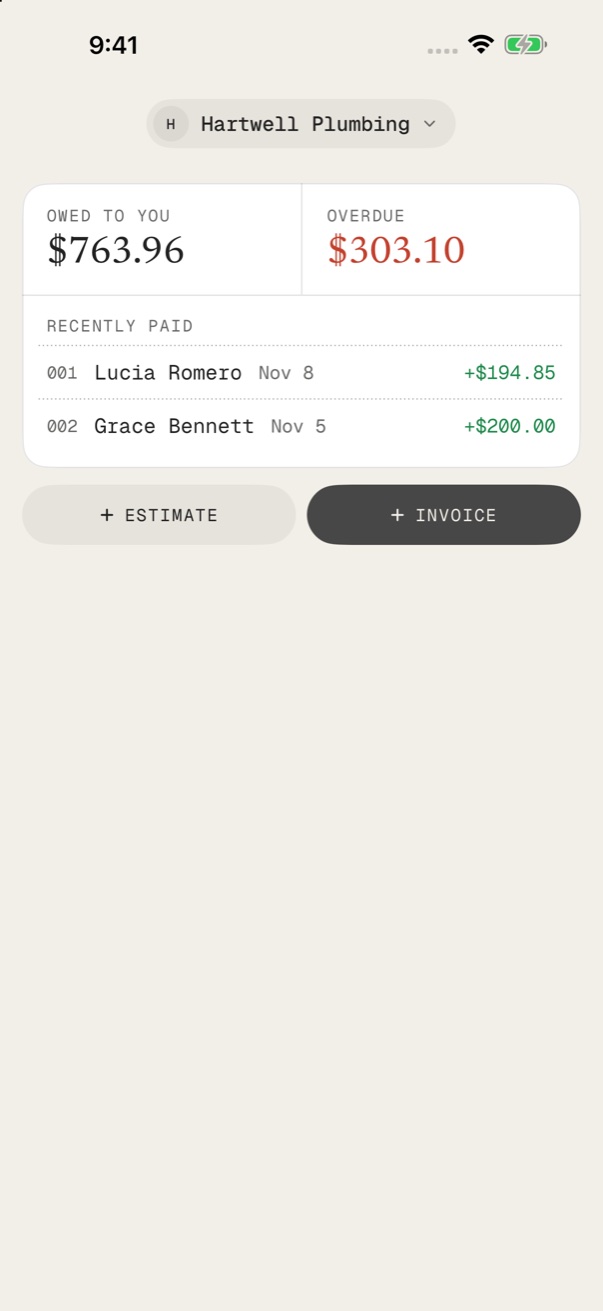

INV-0012 · Lucia Romeronow
Paid in full, $1,840.00
iPhoneiPhone DuoiPad
No account
Open the app, start.No ads
Nothing in your way.Paid to your account
Clients pay you directly.Records stay yours
On your phone and iCloud.What it does
From the first quote to the last payment.
The things that get you paid sooner. Each one has its own page.
Get paid by scan
Every invoice can carry a quick way to pay. Your client pays in seconds, and the money goes to you, not us.
Learn more→Estimates that get signed
Your client approves the price right there with you, and the job is ready to invoice.
Learn more→Always know who owes you
What is paid, what is waiting and what is late, the moment you open the app.
Learn more→Follow up at the right time
Invoice Carry tells you when a payment needs a nudge, and helps you say it kindly.
Learn more→Invoices that look like you
A wide choice of looks, your logo and your colour, on every document you send.
Learn more→Made for work on site
Everything happens on your phone, at the door, in the van or on the roof.
Learn more→How it works
Three steps. Done before you leave.
- 1
Add the job
Client, items and your rate. Saved clients fill in.
- 2
Send the PDF
By email, WhatsApp or text, before you leave.
- 3
Get paid
The client scans the pay code. The receipt is one tap.
Your first invoice is free. No account needed.
Get the app→Use cases
Made for people who work on the job.
Also inside
Everything else a small business needs.
Documents
- Invoices, estimates and quotes
- Receipts and credit notes
- Your logo and signature
- PDFs in 7 languages
Money
- Deposits and part payments
- Taxes, or prices with tax included
- Expenses and mileage
- Reports and Excel export
Clients and jobs
- Saved clients and items
- Import from Contacts
- A folder for every job
- Repeat invoices for regulars
Yours only
- No account, no ads
- Your data stays with you
- More than one business
- iPhone, iPhone Duo and iPad together
How it compares
Invoice Carry, other invoice apps, and templates.
A fair, general picture. Other apps differ, so check the ones you are looking at.
| Invoice Carry | Most invoice apps | Word or Excel template | |
|---|---|---|---|
| Make the invoice on your phone, on site | ✓ | ✓ | No |
| Client approves the estimate with you | ✓ | some | No |
| A way to pay right on the invoice | ✓ | some | No |
| Paid straight into your own account | ✓ | varies | ✓ |
| No account or sign-up | ✓ | varies | ✓ |
| No ads | ✓ | varies | ✓ |
| Knows who is late and reminds you | ✓ | ✓ | No |
| Records stay on your own devices | ✓ | varies | ✓ |
Finish the job, send the invoice, get paid before you leave.
Get the app→Private by default
Your clients stay with you.
No account and no ads. Your clients stay with you.
No account
Open the app and start. No sign-up, no email.
No ads
Nothing about your clients leaves your phone.
Paid into your account
When a client pays, the money goes to you.
Your own iCloud
iPhone, iPhone Duo and iPad stay together through your own iCloud.
Free tools
Free invoice tools, right in your browser.
Make one document or work out a number. No sign-up, no watermark, nothing uploaded.
Invoice generator
Make a PDF invoice in your browser. Free, no sign-up, no watermark.
Open →Estimate generator
Write a job estimate with labour, materials and tax. Download the PDF.
Open →Receipt generator
Proof of payment for cash, card or transfer, saved as a clean PDF.
Open →Quote generator
Send a fixed-price quote for a job or service. Free PDF, no sign-up.
Open →Rent receipt generator
A clear rent receipt with the period covered, ready to print or send.
Open →Net 30 calculator
Exact due date for net 15, 30, 45 or 60, plus any early payment discount.
Open →Sales tax calculator
Add sales tax to any price and see the tax and the total.
Open →Markup calculator
Turn your cost and markup into a selling price, profit and margin.
Open →Done typing it again? The app keeps your clients and items.
Get the app→From the blog
Plain answers about getting paid.
Questions
All questions→Short answers, by topic.
Getting started
What is Invoice Carry?+
An app for iPhone, iPhone Duo and iPad that makes invoices, estimates, quotes and receipts, and helps you get paid sooner.
Who is it for?+
People who work on the job or run a small business: trades, cleaners, freelancers, food carts, small shops and more.
Do I need an account?+
No. There is no sign-up and no email needed. Open the app and start.
Getting paid
Does Invoice Carry take a fee from my payments?+
No. When a client pays, the money goes to you. We never hold it.
Can my client pay straight from the invoice?+
Yes. Every invoice can carry a quick way to pay that your client opens from their phone.
Can my client pay while I am still there?+
Yes. You can show the way to pay on your screen and the client pays from their own phone.
Documents
Which documents can I make?+
Invoices, estimates, quotes, receipts and credit notes.
Can my client sign an estimate?+
Yes. Your client can approve and sign the estimate with you, and it is ready to invoice.
Can I add my logo?+
Yes. Add your logo, pick a look and a colour, and every document follows.
Privacy and data
Where is my data kept?+
On your device, and in your own iCloud if you choose to keep devices together.
Are there ads in the app?+
No. There are no ads in the app.
Can I export my data?+
Yes. You can export your records, including to Excel.
Your next invoice can be the paid one.
Your first document is free. No account needed.